How to Automate Airtable Certificate Issuance

Why Airtable Cannot Issue Certificates
Let me tell you about my worst Friday of last spring.
I had just finished running a six week product design cohort. Thirty eight learners. Everything lived in one tidy Airtable base. Names, emails, module scores, completion dates, all color coded. I was very proud of that base.
Then the cohort ended and I needed thirty eight certificates.
I opened Page Designer and felt clever for roughly four minutes. Then I found out I had to print each record separately. Thirty eight times. I also misspelled one learner's name. She emailed me about it. Politely. Twice.
Here is the short version. Airtable is a database, not a credentialing tool. It holds every field your certificate needs. It does not design, personalize, deliver, or verify anything.
So if you have searched for how to generate an Airtable certificate automatically, you are not missing a hidden setting. The feature does not exist. What you need is an Airtable integration that adds a credentialing layer on top of your base.
What Airtable Actually Offers Natively
Airtable does give you three partial tools. All three are useful. None of them finishes the job.
Page Designer extension. This lets you build a printable layout from a record. It is available on paid plans only. Airtable's own documentation is refreshingly direct about the ceiling here. Per Airtable's printing guide, batch printing multiple records is not supported. The same page confirms you cannot run a Page Designer print action inside an automation.
Airtable automations. These can send an email when a record changes. However, they cannot attach a Page Designer layout to that email. So you still download files by hand.
Airtable Sync. The built-in sync feature pulls records in from another base or from external sources, which is genuinely good at keeping data in sync across a growing Airtable database. It has nothing to say about issuing a credential.
That leaves four real gaps:
| What You Need | Airtable Native | Result |
|---|---|---|
| Bulk generation | Not supported | One export per person |
| Automated delivery | Email only, no certificate attached | Manual sending |
| Unique credential ID | None | No tamper protection |
| Public verification | None | You answer employer emails yourself |
A printed PDF is a file. A credential is a record someone else can check. That difference matters more every year, and it is the same gap we cover in LMS certificates vs a digital credentialing platform.
Popular Airtable Integrations And Certificates
The integration options around Airtable cluster into a handful of types. Knowing which type you are shopping for saves a lot of time.
- CRM syncs. Pairing HubSpot with Airtable, or Salesforce, keeps contact and deal records aligned across tools.
- Data import tools. Something like Data Fetcher pulls data from external APIs on a schedule and drops it directly into Airtable.
- Project management sync. A two way sync integration with Asana or Jira, so status lives in one place instead of three.
- Workflow automation platforms. Zapier, Make, and Pabbly Connect sit between Airtable and thousands of other apps, listening for triggers and actions.
- Credentialing. Wauld, which turns finished Airtable records into certificates and digital badges.
Those first three integrations allow data to move between systems. Useful, but none of them design a certificate. Only the last two touch credentialing at all, and only the last one actually produces the credential. That is the whole job of choosing the right integration: match the tool to the outcome rather than to the marketing copy.
Where Wauld Fills The Gap
Wauld does not replace your base. Your data stays in Airtable exactly where you like it. Wauld watches for the rows you care about and handles everything after that.
There is no native integration to install inside Airtable, which is deliberate. Wauld connects through the automation tools you already pay for, through a webhook, or through a plain CSV import.
Here is what each Airtable certificate gains:
- A unique credential ID on every issued certificate, so records cannot be quietly edited.
- A hosted verification page that employers can open without contacting you.
- Dynamic attributes that pull course name, score, instructor, and dates straight from your columns.
- A recipient wallet with one click LinkedIn sharing, plus PDF and PNG downloads.
- Engagement analytics covering opens, downloads, shares, and verification clicks.
- Digital badges using identical automation logic, useful for per module milestones.
Wauld also fixes the small thing that ruined my Friday. Long names and long course titles do not break the layout, because the design builder handles text sizing for you.
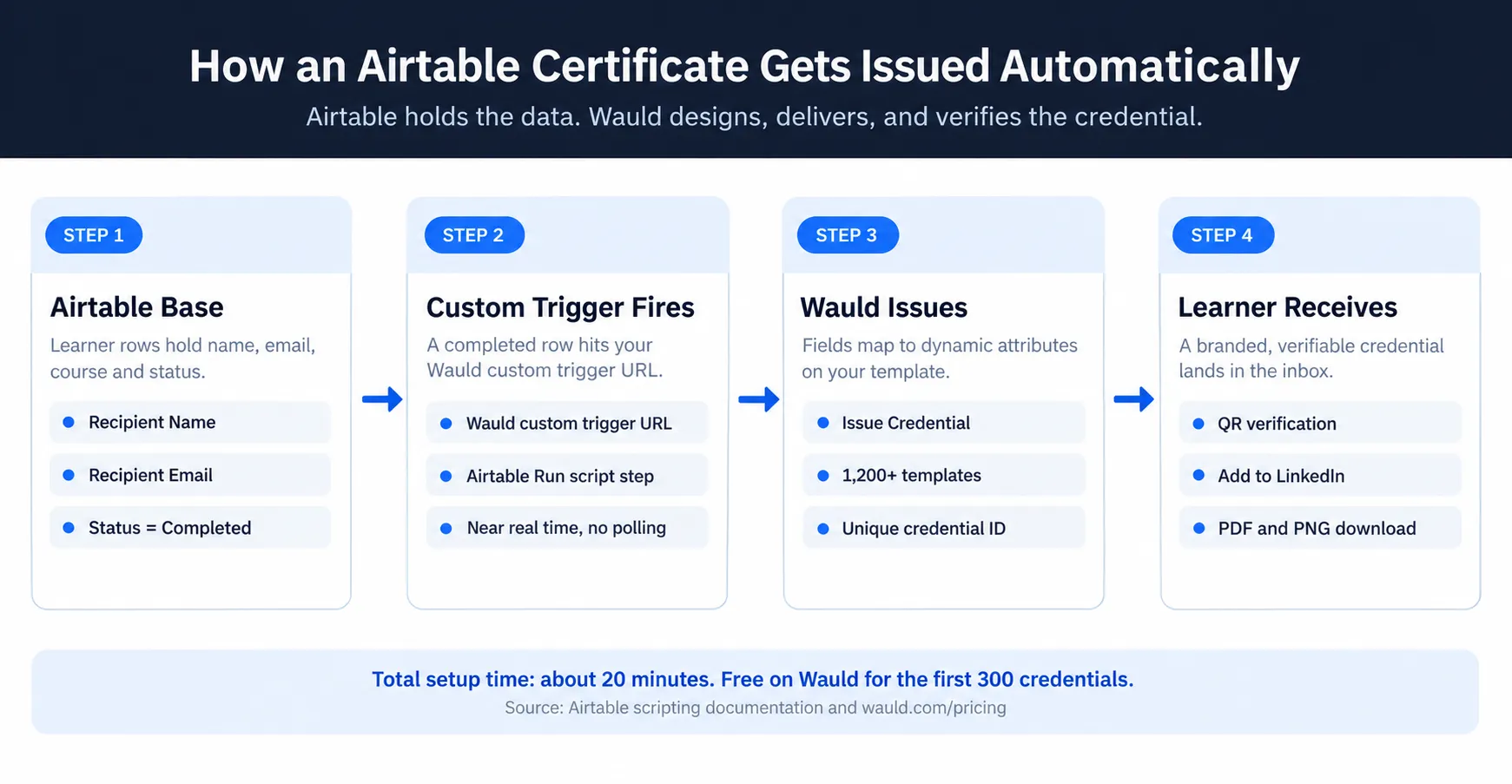
If you want the verification side explained properly before you commit, our guide to adding a QR code for certificate verification walks through what the recipient and the employer each see.
Four Ways To Integrate Airtable
Pick one. You do not need all four.
1. Zapier Automation Setup
This is the fastest route for most course issuers, because it is entirely no-code.
Airtable's Zapier app currently offers two triggers, according to Zapier's Airtable documentation:
| Trigger | Fires When | Use It For |
|---|---|---|
| New Record | A record is created, or first enters a chosen view | Clean, one time issuance |
| New or Updated Record | A record is created or edited | Status changes on existing rows |
Use New Record and point it at a filtered view called Completed. That way only finished learners get a certificate.
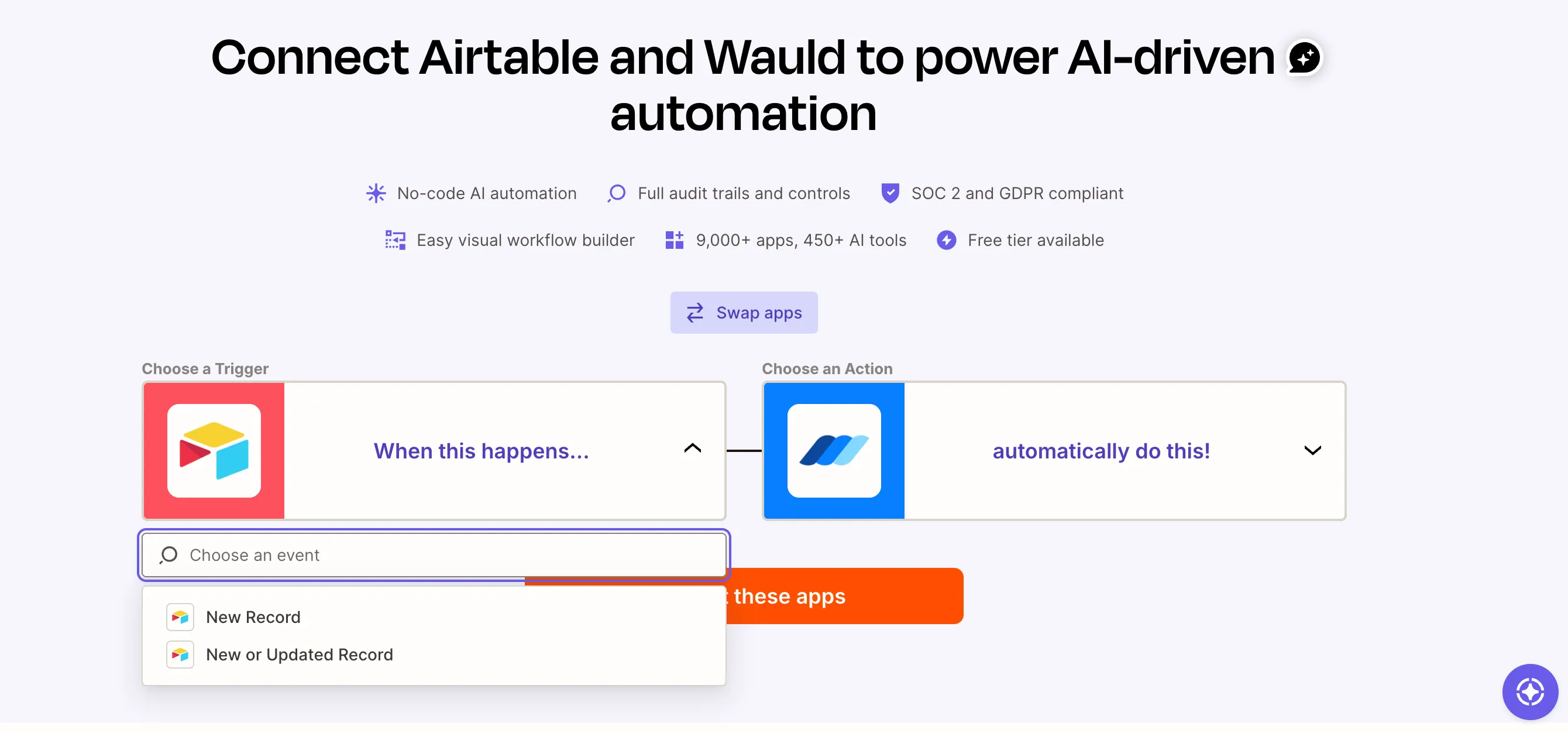
When you add Airtable as the trigger app, Zapier asks you to authorize your Airtable account over OAuth, then reads your bases and views for you.
Setup steps:
- In Airtable, create a view filtered to
Status = Completed. Include Name, Email, Course, and Date. - In Wauld, open Integrations, select Zapier, and click Generate Token. Treat it like a password.
- In Zapier, set Airtable as the trigger app and choose New Record, then select your base, table, and view.
- Add Wauld as the action and choose Issue Credential.
- Select your workspace, engagement, and document. Map Recipient Name and Recipient Email first.
- Map your extra columns to dynamic attributes, then test with your own email address.
If you have never built one of these before, our step by step guide to automating certificate issuance with Zapier covers the same six steps with screenshots.
Best for: ongoing cohorts where certificates should go out without anyone remembering to send them.
One honest caveat. Airtable triggers poll on a schedule rather than firing instantly. Expect a delay of roughly two to fifteen minutes depending on your Zapier plan.
2. Make Or Pabbly Connect
The logic is identical. Only the middleware changes.
Wauld connects through Make, Pabbly Connect, Integrately, Power Automate, and several others. All of these appear on every plan, including Free.
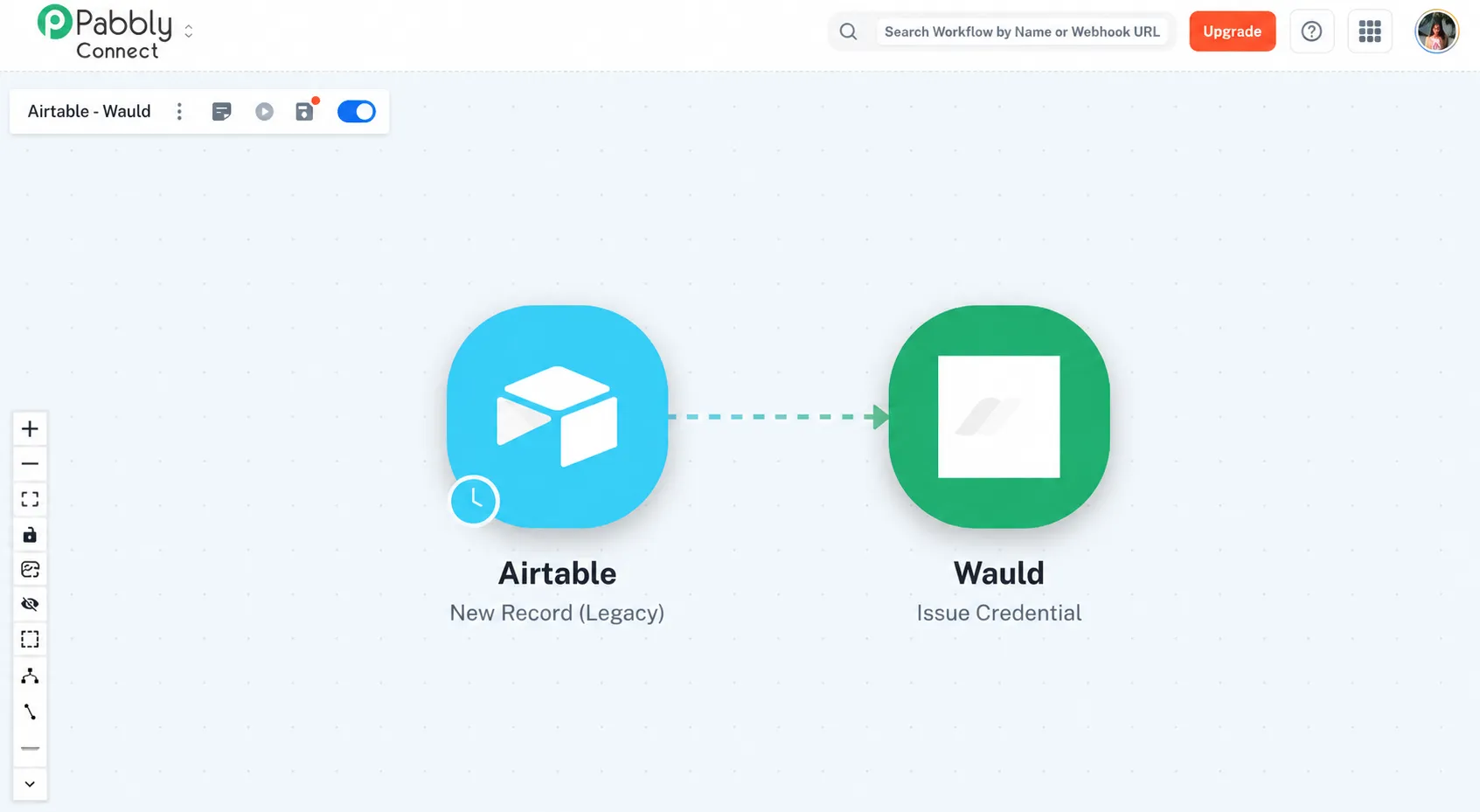
Teams usually switch here for cost reasons. Pabbly, for example, does not count internal filter and formatter steps against your task limit. Only real app actions count. Make and Pabbly are also more comfortable with complex workflows once you start branching on score or cohort.
Best for: high volume programs where Zapier task pricing starts to sting, or any workflow moving a large volume of data each month.
3. Custom Trigger URL
Wauld generates a unique trigger URL for each credential document. Anything that can send a POST request can issue a credential.
Airtable can do this natively with a "Run script" automation step, so no third-party tool sits in the middle and issuance happens in near real time. If you would rather drive it from outside the base, the same URL works from any script that reads the Airtable API and posts the fields across.
Custom triggers and webhooks are included on the Wauld Free plan. Full API access, however, sits on Enterprise.
Best for: developer led teams, large bases, or anyone avoiding another subscription.
4. CSV Bulk Upload
Sometimes automation is the wrong answer. This is the zero tech option.
- Filter your Airtable view to the learners you want.
- Export that view to CSV and clean the rows.
- Import the file into Wauld and map the columns.
- Preview one certificate, then issue the batch.
Best for: one off cohorts, compliance batches, and back filling learners who never received anything.
Honestly, I still use this method when I want a human to eyeball the list before it goes out. The column mapping works the same way as it does when you generate certificates from Google Sheets, because an Airtable export and a spreadsheet export land in Wauld looking identical.
Comparing Four Airtable Integration Methods
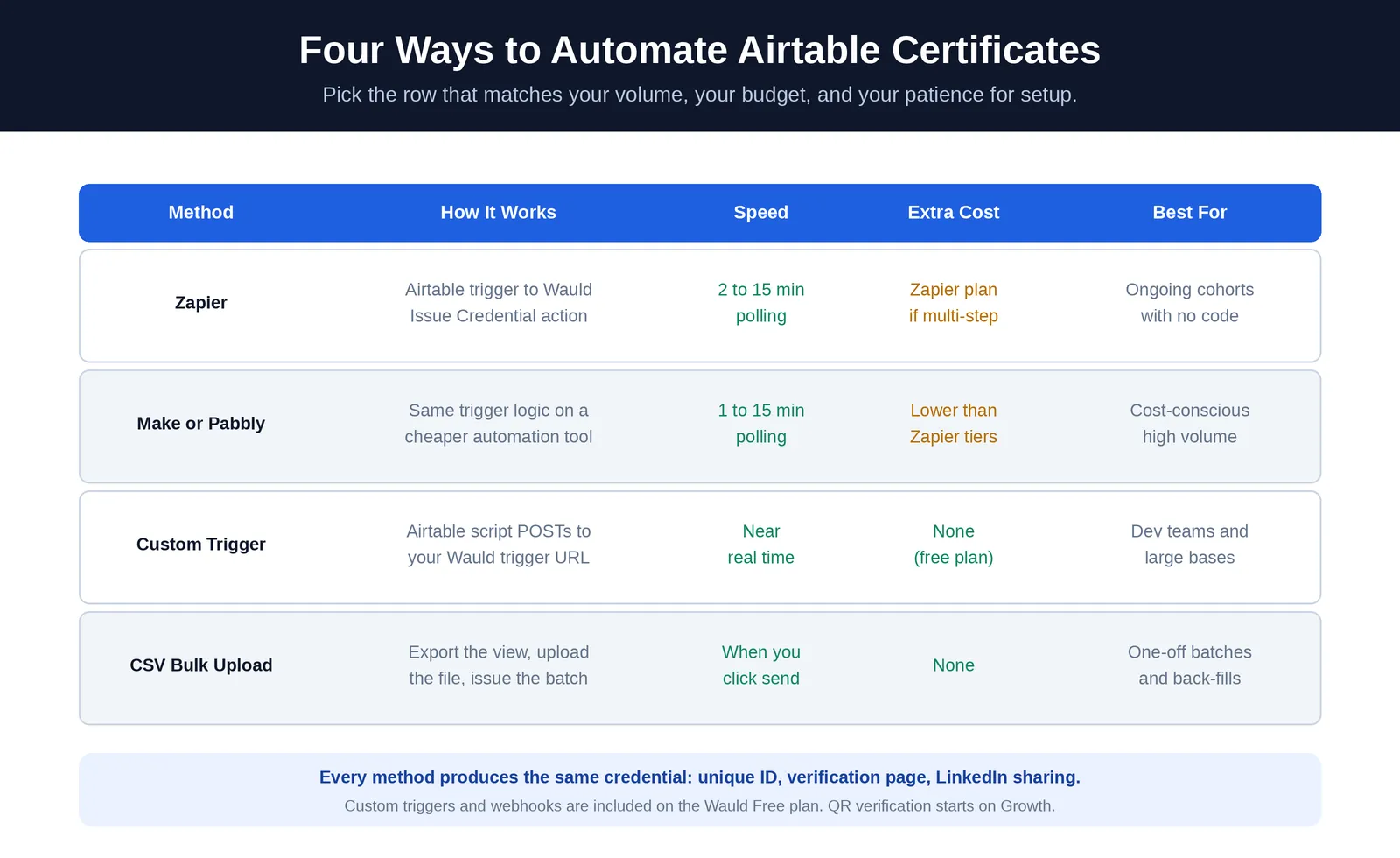
Airtable Certificate Use Cases Explained
Course completion is the obvious one. These are the setups I see working well beyond it.
- Cohort programs. One table per cohort, one Wauld document per cohort. Reporting stays clean.
- Module badges. Issue a digital badge when a learner clears each unit, then a certificate at the end.
- Compliance renewals. Set an expiry date and let Wauld send reminders before it lapses.
- Event attendance. Log check ins to Airtable, then trigger attendance credentials the same day.
- Membership credentials. Associations can issue annual credentials from a members table.
- Internal training. HR teams that use Airtable to track onboarding can certify each completed path.
What all six use cases have in common is that they replace manual data entry and repetitive tasks with a workflow nobody has to remember on a Friday afternoon.
Score based routing is worth a mention too. Keep separate views for pass, distinction, and retake. Point a different Wauld document at each one. Your learners get the right certificate without you sorting anything.
Airtable Integration Limits Worth Knowing
Three things I would want a colleague to tell me.
- Polling delay is real. Zapier and Make check Airtable on a schedule. Instant Airtable triggers are not available. Use a custom trigger if seconds matter.
- Feature tiers differ. Wauld's Free plan covers 300 credentials, bulk issuance, and sharing. QR code verification, expiry management, and scheduled issuance start on the Growth plan at $39 per month. Full pricing sits on the Wauld pricing page.
- Existing rows can surprise you. If your table already holds hundreds of records, activating an automation may issue against them. Start with an empty filtered view and test with one row.
Choosing The Right Integration Method
Your base already holds the hard part. Names are correct, emails are current, completions are logged.
The missing piece is the credentialing layer. Start with Zapier if you want automation this afternoon and no code at all. Use a CSV import if you want a review step first. Use a webhook if your team writes code and hates polling delays. Each one ends in the same place: certificates out the door without manual effort.
Want to see the same setup on another platform? Our walkthrough on how to auto generate certificates from Microsoft Forms follows the same pattern. Workforce teams should also read the training credentials use case, and you can browse the pre-built certificate template library before you design anything.
Then go do something better with your Friday than printing thirty eight PDFs. I speak from experience.
Turn your Airtable rows into verifiable certificates
Connect your base with Zapier, a webhook, or a CSV import, and let Wauld design, deliver, and verify every credential. Free for your first 300.
FAQs On Airtable Certificate Automation
Can Airtable generate certificates automatically? No. Airtable has no native certificate feature. Its Page Designer extension creates a printable layout for one record. Airtable's own documentation confirms that batch printing and automated printing are not supported. You need a credentialing tool like Wauld connected to your base.
Which Airtable integration should I use for certificates? If you want the easiest setup, use Zapier or another automation platform. If you want near real time issuance with no middleware, use Wauld's custom trigger URL from an Airtable script. If you are working through a backlog, use a CSV import. All three produce the same verifiable credential.
How do I generate certificates from Airtable data without code? Use Zapier. Set Airtable's New Record trigger on a filtered view, then add Wauld's Issue Credential action. Map your Name and Email columns, test with one row, and turn it on. It is easy to set up and usually takes under thirty minutes.
Can Airtable email certificates to recipients? Airtable automations can send emails, but they cannot attach a Page Designer certificate to them. So the certificate itself still has to be created and attached manually. Wauld handles both generation and branded email delivery in one step.
How do employers verify an Airtable certificate? A PDF exported from Airtable has no verification method. Credentials issued through Wauld include a unique ID and a permanent public verification page. QR code verification is available from the Growth plan upward.
Which Airtable Zapier trigger should I use for certificates? Use New Record with a filtered view such as Status = Completed. It fires once when a record first enters that view. Already have learners sitting in the table? Choose New or Updated Record instead, since you track completion by editing a field.
Can I issue certificates to a whole cohort from Airtable at once? Yes. Export your filtered view to CSV and use Wauld's bulk issuance. This is the better choice for historical records, because automations only catch rows added after you switch them on.
Does automating Airtable certificates cost anything? Wauld is free for your first 300 credentials, and custom triggers and webhooks are included on that plan. Zapier may require a paid tier for multi step Zaps. A custom trigger from an Airtable script avoids middleware costs entirely.